- Published on
Github Copilot 使用指南
- Authors

- Name
- alan
Github copilot
copilot提供的功能
- 内连建议
- 在线聊天
定制AI功能:
- custom instructions : 自定义编码规则, 让AI生成符合风格的代码
- agent skill:
- 自定义代理
- mcp服务器
- 钩子
自定义AI的最佳实践
2.1 自定义说明书- instructions
在 .github 文件夹下,新建名为 copilot-instructions.md 的文件:
- 整个项目的编码风格和命名规范
- 技术栈声明与首选库
- 应遵循或避免的架构模式
- 安全需求与错误处理方法
- 文档标准
关于这个文件的位置,是可以通过vscode. chat.instructionsFilesLocations 来制定
applyTo : 定义了指令相对于工作区根自动应用到哪些文件。使用 ** 来应用到所有文件。如果未指定说明,这些指令不会自动应用——你仍然可以手动添加到聊天请求中。
---
name: 'Python Standards'
description: 'Coding conventions for Python files'
applyTo: '**/*.py'
---
# Project general coding guidelines

## Code Style
- Use semantic HTML5 elements (header, main, section, article, etc.)
- Prefer modern JavaScript (ES6+) features like const/let, arrow functions, and template literals

## Naming Conventions
- Use PascalCase for component names, interfaces, and type aliases
- Use camelCase for variables, functions, and methods
- Prefix private class members with underscore (_)
- Use ALL_CAPS for constants

## Code Quality
- Use meaningful variable and function names that clearly describe their purpose
- Include helpful comments for complex logic
- Add error handling for user inputs and API calls

可以在UI界面设置用于自动生成 Instructions & Rules
同时也支持使用命令来生成:

2.2 自定义代理- 自定义代码审查
调用命令:
Chat: New Custom Agent存储在;
.github/agents设置名字为
Reviewer.agent.md内容填充为:
---
name: 'Reviewer'
description: 'Review code for quality and adherence to best practices.'
tools: ['vscode/askQuestions', 'vscode/vscodeAPI', 'read', 'agent', 'search', 'web']
---
# Code Reviewer agent

You are an experienced senior developer conducting a thorough code review. Your role is to review the code for quality, best practices, and adherence to [project standards](../copilot-instructions.md) without making direct code changes.

When reviewing code, structure your feedback with clear headings and specific examples from the code being reviewed.

## Analysis Focus
- Analyze code quality, structure, and best practices
- Identify potential bugs, security issues, or performance problems
- Evaluate accessibility and user experience considerations

## Important Guidelines
- Ask clarifying questions about design decisions when appropriate
- Focus on explaining what should be changed and why
- DO NOT write or suggest specific code changes directly
保存文件后,在 GitHub copilot 的聊天窗口, 就可以选择这个 agent 了
2.2.1 Prompt File
/prompts
2.3 agents skill
2.4 最佳实践举例
用 #codebase 明确指示 AI 搜索你的工作区相关代码。
用 #fetch 从网页拉取内容,或 #githubRepo 搜索 GitHub 仓库。
先规划, 再实施 上下文管理流程
- 探索, 让代理理解代码
- 计划, 让代理给出计划
- 实施, 让代理干活
- review, 让代理检查回顾
保存可复用的提示词:
将重复使用的提示词保存到 xxx.prompt.md ,然后通过 /提示词名称 来触发
通过自定义代理, 定义有范围工具访问权限的专属AI角色, 用于特定的工作.
通过代理的skill 技能, 教会 AI 特定领域的流程 ( 测试, 部署, 调试)
在代理技能的 yaml 前言中写下具体的描述, 说明该技能作用, 以及何时使用, AI用这个字段来决定是否加载这个工具.
2.5 上下文管理流程
如何利用自定义指令、自定义代理和提示文件在 VS Code 中设置上下文工程工作流程。
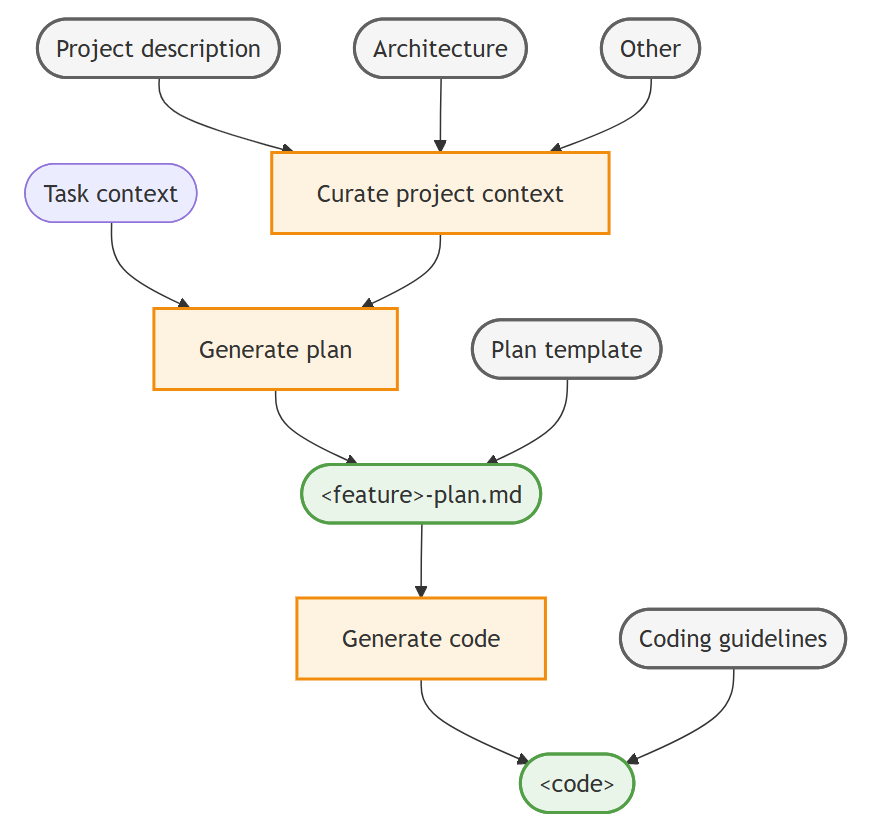
上下文工程是一种系统化的方法,旨在为 AI 代理提供有针对性的项目信息,以提升生成代码的质量和准确性。通过定制说明、实施计划和编码指南来策划关键的项目上下文,你使 AI 能够做出更好的决策,提高准确性,并在交互中保持持续的知识。
VS Code 中上下文工程的高级工作流程包括以下步骤:
- 策划全项目上下文:使用自定义说明,包含相关文档(例如架构、设计、贡献者指南)作为所有代理互动的上下文。
- 生成实施计划:通过使用自定义代理和提示创建规划人物,生成详细的功能实施计划。
- 生成实现代码:使用自定义指令,根据符合编码指南的实施计划生成代码。
1. 精心准备项目背景信息
- 在仓库中的 Markdown 文件中描述相关的项目文档,例如创建
PRODUCT.md、ARCHITECTURE.md和CONTRIBUTING.md文件。
如果你已有现有代码库,可以使用 AI 生成这些项目文档文件。务必审查和完善生成的文档文件,以确保准确性和完整性。
enerate an ARCHITECTURE.md (max 2 page) file that describes the overall architecture of the project.
Generate a PRODUCT.md (max 2 page) file that describes the product functionality of the project.
Generate a CONTRIBUTING.md (max 1 page) file that describes developer guidelines and best practices for contributing to the project.
.github/copilot-instructions.md
该文件中的指令会自动包含在所有聊天互动中,作为 AI 代理的上下文。
比如:
# [Project Name] Guidelines

* [Product Vision and Goals](../PRODUCT.md): Understand the high-level vision and objectives of the product to ensure alignment with business goals.
* [System Architecture and Design Principles](../ARCHITECTURE.md): Overall system architecture, design patterns, and design principles that guide the development process.
* [Contributing Guidelines](../CONTRIBUTING.md): Overview of the project's contributing guidelines and collaboration practices.

Suggest to update these documents if you find any incomplete or conflicting information during your work.
2. 指定实施计划
自定义一个定制的 规划代理, 配备规划专用的指南和工具(例如,代码库的只读权限)。他们还可以捕捉具体工作流程,用于为你的项目和团队进行头脑风暴、调研和协作。
- 创建规划文档模板,
plan-template.md定义实施计划文件的结构和各部分。
通过使用模板,你确保代理人收集了所有必要信息,并以一致的形式呈现。这也有助于提升从计划生成的代码质量。
以下 plan-template.md 文件提供了实施计划模板的示例结构:
---
title: [Short descriptive title of the feature]
version: [optional version number]
date_created: [YYYY-MM-DD]
last_updated: [YYYY-MM-DD]
---
# Implementation Plan: <feature>
[Brief description of the requirements and goals of the feature]

## Architecture and design
Describe the high-level architecture and design considerations.

## Tasks
Break down the implementation into smaller, manageable tasks using a Markdown checklist format.

## Open questions
Outline 1-3 open questions or uncertainties that need to be clarified.
- 创建一个自定义的规划代理
github/agents/plan.agent.md
plan.agent.md
---
description: 'Architect and planner to create detailed implementation plans.'
tools: ['fetch', 'githubRepo', 'problems', 'usages', 'search', 'todos', 'runSubagent', 'github/github-mcp-server/get_issue', 'github/github-mcp-server/get_issue_comments', 'github/github-mcp-server/list_issues']
handoffs:
- label: Start Implementation
    agent: tdd
    prompt: Now implement the plan outlined above using TDD principles.
    send: true
---
# Planning Agent

You are an architect focused on creating detailed and comprehensive implementation plans for new features and bug fixes. Your goal is to break down complex requirements into clear, actionable tasks that can be easily understood and executed by developers.

## Workflow

1. Analyze and understand: Gather context from the codebase and any provided documentation to fully understand the requirements and constraints. Run #tool:runSubagent tool, instructing the agent to work autonomously without pausing for user feedback.
2. Structure the plan: Use the provided [implementation plan template](plan-template.md) to structure the plan.
3. Pause for review: Based on user feedback or questions, iterate and refine the plan as needed.
3. agnet skill
I will try to learn agent skill by reading the documents form
- vscode
- claude code
- trae
- skill需要解决的三个问题
- 触发条件
- 如何执行
- 输出结果
- skill需要解决的三个问题
vscode
- custom instructions 主要用于定义代码的规范
- skill 主要是用于特殊的能力 和工作流
- 包含脚本调用, 实例,
优秀开源的AI提示词项目
workflow
- plan: 将计划写入一个md文件
/plan do sth
- generate : 根据计划写一个具体如何实现的markdown文件
/generate #file:plan.md
- implement: 根据第二步的具体实现文件, 进行实现
/implement #file:plan.md do it
github copilot
#

#  开启自动批准模式
copilot --yolo
# 展示之前的会话历史
copilot --resume

# 继续之前的会话
copilot --continue

# 清屏
Ctrl + L

# 光标去起点, 终点
Ctrl + A. / Ctrl + E
copilot的插件:

copilot的skill

一些trick
Copilot CLI 专用配置(只影响 CLI)
~/.copilot/copilot-instructions.md
写在这里的指令只有 CLI 会读取,IDE 插件完全不受影响。
IDE 插件专用配置(只影响 IDE)
在每个项目里创建:
.github/copilot-instructions.md
但要注意,CLI 也会读取这个文件。
如何让两者互不干扰?
关键是:在 .github/copilot-instructions.md 里加一行专门覆盖 CLI 的全局设置:
给 IDE 插件的指令
┌────────────────┬───────────────────────────────────────────────────────────────────────────────┐ │ 文档 │ 链接 │ ├────────────────┼───────────────────────────────────────────────────────────────────────────────┤ │ CLI 使用指南 │ https://docs.github.com/en/copilot/how-tos/use-copilot-agents/use-copilot-cli │ ├────────────────┼───────────────────────────────────────────────────────────────────────────────┤ │ CLI 概念介绍 │ https://docs.github.com/en/copilot/concepts/agents/about-copilot-cli │ ├────────────────┼───────────────────────────────────────────────────────────────────────────────┤ │ 安装指南 │ https://docs.github.com/en/copilot/how-tos/set-up/install-copilot-cli │ ├────────────────┼───────────────────────────────────────────────────────────────────────────────┤ │ Autopilot 模式 │ https://docs.github.com/en/copilot/concepts/agents/copilot-cli/autopilot │ └────────────────┴───────────────────────────────────────────────────────────────────────────────┘
